

Translations for Sodium
Resource pack · by robotkoer · 23.7M downloads · Minecraft 26.3
Sodium's menus, finally in your language
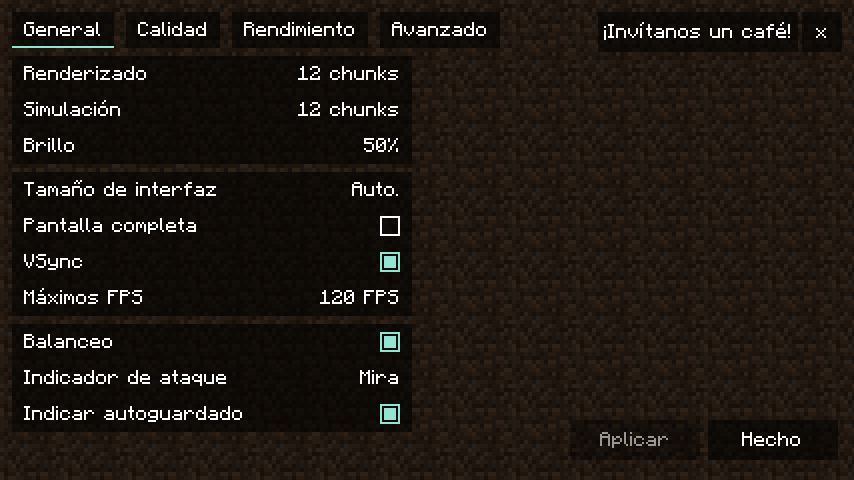
Sodium replaces Minecraft's video settings screen with its own, and many of those options appear in English even when the rest of your game is not. Translations for Sodium by robotkoer fills that gap. It is an unofficial resource pack carrying volunteer translations of Sodium's menus, option names and tooltips, so the settings screen matches the language you play in.
Because it is a resource pack and not a mod, nothing about how Sodium behaves changes – only the text is swapped.
Languages included
As of August 2026 the pack covers 37 languages, grouped here by region:
- Western and Northern Europe – French, German, Dutch, Italian, Spanish, Portuguese, Danish, Swedish, Norwegian Nynorsk, Finnish, Estonian and Anglish (an English variant without borrowed words).
- Central and Eastern Europe – Polish, Czech, Hungarian, Romanian, Bulgarian, Greek, Russian, Ukrainian, Belarusian and Serbian in Cyrillic.
- Asia – Japanese, Korean, Vietnamese, Malay plus Malay written in Jawi, and three flavours of Chinese: Simplified, Traditional, and Traditional for Hong Kong.
- Middle East – Arabic, Hebrew, Persian and Turkish.
- The Americas – Brazilian Portuguese and Venezuelan Spanish.
Which languages are not accepted
The project leaves out fictional languages such as Esperanto, joke languages such as LOLCAT, and minority languages – those with fewer than one million speakers or without enough translation progress in Mojang's own Minecraft Crowdin project. The reasoning is practical: those languages invite vandalism and are difficult to review properly.
How to use it
- Install Sodium first; without it the pack does nothing.
- Put the pack in your
resourcepacksfolder and enable it under Options → Resource Packs. - Set your game language as usual – the Sodium screens follow it.
It is client-side only and has versions for Minecraft 1.17.1 through the current releases. New builds come out every Saturday when translations have changed, so if a fresh translation is not in your copy yet, check again after the next release.
Helping with translations
All work happens on Crowdin. Create a free Crowdin account, join the Sodium project and you can:
- Translate phrases that have no translation yet.
- Suggest better wording for an existing translation.
- Vote existing translations up or down by quality.
Submitting a translation means agreeing to release it under Creative Commons Zero (CC0). Crowdin's own guide for volunteer translators explains the editor if you are new.
- A translation is wrong or you are unsure how to translate something – open an issue on that specific phrase in the Crowdin editor.
- Your language is missing or you want to become a proofreader – ask in the project's Crowdin Discussions.
Free for modpacks
Thanks to CC0, anyone may include the pack in a Modrinth, CurseForge, packwiz or any other modpack with no special permission. That makes it an easy add for pack makers targeting non-English players.
Who it helps
Any player who would rather not guess what an English option means, and modpack creators building for an international audience. It pairs naturally with Sodium Extra and Reese's Sodium Options, which add more settings to the same menu.
FAQ
Why are Sodium's settings in English when my game is in another language?
Sodium itself ships with limited translations. This unofficial resource pack adds community translations for its menus, so enable it and the Sodium video settings follow your game language.
Is Vietnamese included?
Yes. Vietnamese is on the project's language list, along with most major European and Asian languages.
Can I put this pack in my modpack?
Yes. Anyone may bundle it in a Modrinth, CurseForge, packwiz or any other modpack without asking, since the translations are CC0.
My language is missing. How do I get it added?
Request it in the project's Crowdin Discussions. Fictional, joke and very small languages are not accepted.
Gallery


Downloads by version
| Minecraft | Mod version | File | |
|---|---|---|---|
| 26.3 | v9.0.0 | 0.3 MB | Download |
| 26.2 | v9.0.0 | 0.3 MB | Download |
| 26.1.2 | v9.0.0 | 0.3 MB | Download |
| 26.1.1 | v9.0.0 | 0.3 MB | Download |
| 26.1 | v9.0.0 | 0.3 MB | Download |
| 1.21.11 | v9.0.0 | 0.3 MB | Download |
| 1.21.10 | v9.0.0 | 0.3 MB | Download |
| 1.21.9 | v9.0.0 | 0.3 MB | Download |
| 1.21.8 | v9.0.0 | 0.3 MB | Download |
| 1.21.7 | v9.0.0 | 0.3 MB | Download |
| 1.21.6 | v9.0.0 | 0.3 MB | Download |
| 1.21.5 | v9.0.0 | 0.3 MB | Download |
| 1.21.4 | v9.0.0 | 0.3 MB | Download |
| 1.21.3 | v9.0.0 | 0.3 MB | Download |
| 1.21.2 | v9.0.0 | 0.3 MB | Download |
| 1.21.1 | v9.0.0 | 0.3 MB | Download |
| 1.21 | v9.0.0 | 0.3 MB | Download |
| 1.20.6 | v9.0.0 | 0.3 MB | Download |
| 1.20.5 | v9.0.0 | 0.3 MB | Download |
| 1.20.4 | v9.0.0 | 0.3 MB | Download |
| 1.20.3 | v9.0.0 | 0.3 MB | Download |
| 1.20.2 | v9.0.0 | 0.3 MB | Download |
| 1.20.1 | v9.0.0 | 0.3 MB | Download |
| 1.20 | v9.0.0 | 0.3 MB | Download |
| 1.19.4 | v1.11.0 | 0.1 MB | Download |
| 1.19.3 | v1.11.0 | 0.1 MB | Download |
| 1.19.2 | v1.11.0 | 0.1 MB | Download |
| 1.19.1 | v1.11.0 | 0.1 MB | Download |
| 1.19 | v1.11.0 | 0.1 MB | Download |
| 1.18.2 | v1.11.0 | 0.1 MB | Download |
| 1.18.1 | v1.11.0 | 0.1 MB | Download |
| 1.18 | v1.11.0 | 0.1 MB | Download |
| 1.17.1 | v1.11.0 | 0.1 MB | Download |
How to install this mod
- Click “Download” to get the .zip – do not unzip it.
- Copy it into
.minecraft/resourcepacks. - In game: Options → Resource Packs → click the arrow to enable it.
- Using several packs? Put the most important one on top.
💬 Comments
🔗 Works well with

✨ You might also like
New Glowing Ores
by GridExpert
Makes ores glow to make them more visible, and also adds connected outlines to them so you don't miss a single block. Mod support available

(Bee's) Fancy Crops
by bebebea_loste
My take on prettier farming, compatible with mods
Default Dark Mode
by nebulr
🌙 The Dark Mode Resource Pack for Minecraft: Java Edition

Explorer's Compass structure Translation
by CLOT-LIU
探险者(探险家)指南针结构汉化材质包,可以让你的旅途更加愉快₍˄·͈༝·͈˄*₎◞ ̑̑

Unique Dark
by amongstreality
Dark GUI with unique textures for functional blocks. Dark mode for 80 mods

Vanilla Experience+
by Kryqu
It improves, refines, and fixes various aspects while keeping the Vanilla style.