

Dramatic Skys
Resource pack · by thebaum64 · 11.6M downloads · Minecraft 26.3
A sky for every biome
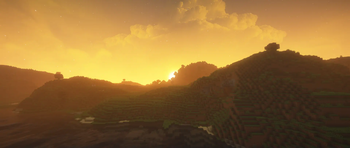
Vanilla Minecraft has one plain blue gradient with square clouds. Dramatic Skys swaps it for high-resolution painted skyboxes with realistic clouds and light. The ambitious part is variety: the author is building a separate sky for each biome, each with its own daytime, sunrise/sunset and night version, so crossing from a desert into a snowy forest also changes what is above you.
Features
- Biome-specific day, sunset and night skies.
- Animated auroras, shooting stars and meteor showers.
- An animated sun and sky textures that change with altitude.
- Color and fog maps so the horizon blends into the sky.
- Rare events like a blood moon, a blue moon and distant tornadoes.
- Works on top of any texture pack, from default to high-resolution.
Requirements
Custom skies are not something vanilla can display, so you need one of these: Skyboxify, Nuit (Fabric skyboxes), Celestial, or OptiFine. On Fabric, those mods also need Fabric API. The pack is client-side only and supports a wide range of Minecraft versions.
Who should use it
Builders who take screenshots, players who spend nights outdoors, or anyone who finds vanilla's sky flat but does not want the cost of shaders. With shaders on, the result depends on whether the shader draws its own sky. Pair it with Fresh Animations or Better Leaves for a fuller visual refresh without heavy hardware.
FAQ
Why does Dramatic Skys show the normal sky?
The pack needs a mod or client that supports custom skyboxes, such as Skyboxify, Nuit or Celestial on Fabric, or OptiFine. Without one, the new skies are not displayed.
Can I use Dramatic Skys with other resource packs?
Yes. It only touches the sky, so place it above your main texture pack in the resource pack list and both will work.
Does Dramatic Skys need shaders?
No. It works without shaders and the author describes it as friendly to modest computers and laptops.
Gallery


Downloads by version
| Minecraft | Mod version | File | |
|---|---|---|---|
| 26.3 | 1.5.3.36.6 | 13 MB | Download |
| 26.2 | 1.5.3.36.6 | 13 MB | Download |
| 26.1.2 | 1.5.3.36.6 | 13 MB | Download |
| 26.1.1 | 1.5.3.36.6 | 13 MB | Download |
| 26.1 | 1.5.3.36.6 | 13 MB | Download |
| 1.21.11 | 1.5.3.36.6 | 13 MB | Download |
| 1.21.10 | 1.5.3.36.6 | 13 MB | Download |
| 1.21.9 | 1.5.3.36.6 | 13 MB | Download |
| 1.21.8 | 1.5.3.36.6 | 13 MB | Download |
| 1.21.7 | 1.5.3.36.6 | 13 MB | Download |
| 1.21.6 | 1.5.3.36.6 | 13 MB | Download |
| 1.21.5 | 1.5.3.36.6 | 13 MB | Download |
| 1.21.4 | 1.5.3.36.6 | 13 MB | Download |
| 1.21.3 | 1.5.3.36.6 | 13 MB | Download |
| 1.21.2 | 1.5.3.36.6 | 13 MB | Download |
| 1.21.1 | 1.5.3.36.6 | 13 MB | Download |
| 1.21 | 1.5.3.36.6 | 13 MB | Download |
| 1.20.6 | 1.5.3.36.6 | 13 MB | Download |
| 1.20.5 | 1.5.3.36.6 | 13 MB | Download |
| 1.20.4 | 1.5.3.36.6 | 13 MB | Download |
| 1.20.3 | 1.5.3.36.6 | 13 MB | Download |
| 1.20.2 | 1.5.3.36.6 | 13 MB | Download |
| 1.20.1 | 1.5.3.36.6 | 13 MB | Download |
| 1.20 | 1.5.3.36.6 | 13 MB | Download |
| 1.19.4 | 1.5.3.36.6 | 13 MB | Download |
| 1.19.3 | 1.5.3.36.6 | 13 MB | Download |
| 1.19.2 | 1.5.3.36.6 | 13 MB | Download |
| 1.19.1 | 1.5.3.36.6 | 13 MB | Download |
| 1.19 | 1.5.3.36.6 | 13 MB | Download |
| 1.18.2 | 1.5.3.36.6 | 13 MB | Download |
| 1.18.1 | 1.5.3.36.6 | 13 MB | Download |
| 1.18 | 1.5.3.36.6 | 13 MB | Download |
| 1.17.1 | 1.5.3.36.6 | 13 MB | Download |
| 1.17 | 1.5.3.36.6 | 13 MB | Download |
| 1.16.5 | 1.5.3.36.6 | 13 MB | Download |
| 1.16.4 | 1.5.3.36.6 | 13 MB | Download |
| 1.16.3 | 1.5.3.36.6 | 13 MB | Download |
| 1.16.2 | 1.5.3.36.6 | 13 MB | Download |
| 1.16.1 | 1.5.3.36.6 | 13 MB | Download |
| 1.16 | 1.5.3.36.6 | 13 MB | Download |
🛡 Files are downloaded directly from Modrinth’s servers – we never modify or rehost them. Modrinth ↗
How to install this mod
- Click “Download” to get the .zip – do not unzip it.
- Copy it into
.minecraft/resourcepacks. - In game: Options → Resource Packs → click the arrow to enable it.
- Using several packs? Put the most important one on top.
💬 Comments
🔗 Works well with

Skyboxify
by omo50
A skybox mod that allows you to use OptiFine skies in Fabric 1.21+

Nuit
by FlashyReese
Allows resource packs to define custom skyboxes. Formerly FabricSkyboxes

Fabric API
by modmuss50
Lightweight and modular API providing common hooks and intercompatibility measures utilized by mods using the Fabric toolchain.
✨ You might also like
Fast Better Grass
by robotkoer
Makes grass and related blocks use the top texture on the sides. Works with other resource packs!

Os' Colorful Grasses
by Oslypsis
Fluffier grasses! Tall, short, or original X style versions available, as well as a mix of the three for the optimal balance of visuals & performance. Get the full version on Patreon!

Default HD 128x
by thebaum64
The classic Minecraft experience but in amazing 128x HD!

Cubic Sun & Moon
by JoeFly
Recreates the Sun and the Moon in 3D and is compatible with mods that add sky features.

Alacrity
by Satellence
32x resource pack with crazy attention to details

Ray's Better Sugarcane
by Rhynx_
Ever wanted better, more natural looking Sugarcane, and don't have the time or energy to get create your own textures, well this is your solution