

Motschen's Better Leaves
Resource pack · by Motschen · 21.9M downloads · Minecraft 26.3
What does Better Leaves change?
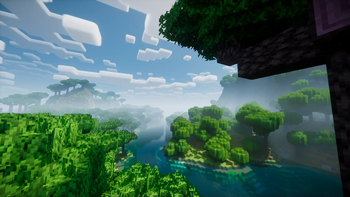
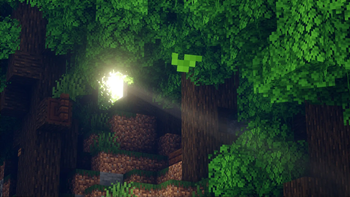
Vanilla leaves are flat cubes, which makes trees look like stacked boxes from a distance. Better Leaves adds extra layers that stick out of each leaf block, so canopies look fuller, fluffier and more natural. It is a normal resource pack, so no mod is needed to use it.
Two generations of the pack
- Version 9 and newer – built for performance. It ships ready-made textures for every supported leaf. The downside is that it does not automatically pick up leaf textures from other texture packs; you follow the author's short guide to compile a version that matches your pack.
- Version 8.1 and older – adds no textures and adapts to whatever leaf textures you have, so it works with almost any pack out of the box. That flexibility costs more performance.
Modded biomes are covered
Recent versions explicitly support a long list of content mods, including Biomes O' Plenty, Oh The Biomes We've Gone, Regions Unexplored, Nature's Spirit, Twilight Forest, Quark, Cobblemon, Terrestria, Wilder Wild and both Aether mods. Trees from those mods get the same bushy treatment.
The v9.5 list also names Alex's Caves, Ad Astra, Ars Nouveau and Ars Elemental, Architect's Palette, Better End, Better Nether, Biome Makeover, Blue Skies, Deep Aether, Deeper and Darker, Dynamic Trees with its add-ons, Ecologics, Enderscape, Eternal Starlight, Forbidden and Arcanus, several Let's Do mods, Traverse, The Undergarden, Windswept and more. The older 8.1 line had its own list, including Croptopia, Druidcraft, Oh The Biomes You'll Go, Upgrade Aquatic and Woods and Mires.
Requirements and tips
- Works on vanilla Minecraft, from 1.13 to 26.3. Client side only.
- Put it in your
resourcepacksfolder and enable it above other packs that change leaves. - For better FPS, the author strongly recommends the optional Cull Leaves mod together with Sodium or Embeddium.
- Using a custom texture pack with version 9? Follow the author's short compile guide (there is a video walkthrough) to generate leaves that match your textures.
- Licensed under MIT; bugs go to the TeamMidnightDust GitHub tracker, and a wiki is available.
If you like this look, the same author also makes Round Trees, which gives logs a rounded shape. Want the full "living world" look? Combine it with Fast Better Grass for smoother hills and Fresh Animations for mobs.
FAQ
Does Better Leaves lower FPS?
Extra leaf layers mean more to draw, so it can cost some FPS in dense forests. The author strongly recommends adding the Cull Leaves mod with Sodium or Embeddium to win that back.
Does Better Leaves work with other texture packs?
Version 9 generates textures for each leaf, so custom texture packs need a few manual steps to build a matching version. Versions 8.1 and older adapt automatically but run slower.
Does Better Leaves need a mod?
No, it is a plain resource pack. Cull Leaves is optional and only helps performance.
Gallery


Downloads by version
How to install this mod
- Click “Download” to get the .zip – do not unzip it.
- Copy it into
.minecraft/resourcepacks. - In game: Options → Resource Packs → click the arrow to enable it.
- Using several packs? Put the most important one on top.
💬 Comments
🔗 Works well with

✨ You might also like

Alacrity
by Satellence
32x resource pack with crazy attention to details

Better 3D Beds
by heycronus
Better 3D Beds is a texture pack for Minecraft that significantly enhances the appearance of beds in the game, making them more realistic and detailed with new 3D models. This texture replaces the old bed models with more beautiful and immersive versions.

Fresh Animations
by FreshLX
Make your game like the trailers! Dynamic animated entities to freshen your Minecraft experience.
Fast Better Grass
by robotkoer
Makes grass and related blocks use the top texture on the sides. Works with other resource packs!

Fresh Animations: Extensions
by FreshLX
A combination of offical extension packs for Fresh Animations

(Bee's) Fancy Crops
by bebebea_loste
My take on prettier farming, compatible with mods