

Photon Shaders
Shader · by sixthsurge · 29.7M downloads · Minecraft 26.3
What Photon looks like
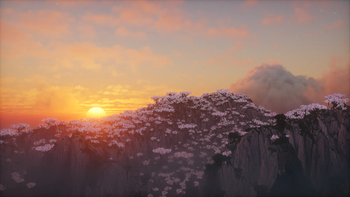
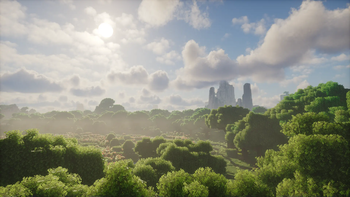
Photon is a gameplay-focused shader pack by sixthsurge with a semi-realistic style. Instead of piling on effects that make the game hard to read, it reworks the parts you notice every minute: the sky, sunlight, shadows and water. Its signature is the clouds – several layers of different cloud types – combined with a weather system that gives each in-game day its own sky.
Highlights
- Rebuilt sky, lighting and water.
- Multi-layer volumetric clouds and varied daily weather.
- Colored block light using a voxel approach, available on the Ultra profile with Iris.
- Soft shadows with penumbras that change size, plus detailed GTAO ambient occlusion.
- Screen-space reflections and volumetric fog.
- Bloom, depth of field and motion blur as camera effects, and sharper image quality through TAA, FXAA and CAS sharpening.
- A temporal upscaling option (off by default) aimed at low-end machines.
- Full labPBR support if you pair it with a PBR resource pack.
- A large settings menu where every part of the shader can be tuned.
Requirements and compatibility
| Loader | Iris (recommended) or OptiFine |
| GPUs | Nvidia, AMD, Intel – not Apple Metal |
| Long-range mods | Distant Horizons, Voxy |
| Minecraft | listed from 1.16.5; the author notes it generally works wherever Iris runs |
Photon is client-side only. Install Iris and Sodium, drop the zip into shaderpacks, and select it in the Shader Packs menu.
When will Photon support the newest Minecraft?
The author's answer is that shader packs barely depend on the Minecraft version. As soon as Iris is out for a new release, Photon should simply run on it – there is no need to wait for a Photon update.
Getting the most from it
Photon ships with presets from low to ultra, and its settings menu lets you change almost every effect. Start on a medium profile, check your frame rate in a forest or near water, then raise quality step by step. If you like Photon's mood but want something brighter and closer to vanilla, compare it with Complementary Reimagined or BSL. Our shader installation guide has troubleshooting for black screens and missing packs.
Credits worth knowing
Photon borrows a few proven techniques, which the author credits openly: the shadow bias method from Emin's Complementary Reimagined (it removes "peter panning" and light leaking underground), DrDesten's depth tolerance for screen-space reflections (fewer false reflections), Jessie's f0/f82 values for labPBR hardcoded metals, and the bloom downsampling approach Sledgehammer Games described for Call of Duty Advanced Warfare. The night-sky galaxy image comes from NASA's Scientific Visualization Studio. The settings menu is translated into Chinese, Italian and Russian by community volunteers. Questions and suggestions go through the author's Discord.
FAQ
Does Photon work on OptiFine?
Yes, but Iris is the recommended loader. Some features, notably the voxel colored lighting in the Ultra profile, only work on Iris.
Does Photon work on a Mac?
The author lists Apple GPUs using Metal as not compatible. It is supported on Nvidia, AMD and Intel graphics.
Is Photon compatible with Distant Horizons?
Yes. The author lists Distant Horizons and Voxy as supported mods, so you can combine Photon with long-range terrain.
Gallery


Downloads by version
How to install this mod
- Install Iris (with Sodium) or OptiFine – Iris runs on Fabric/NeoForge.
- Click “Download” to get the .zip – do not unzip it.
- Copy it into
.minecraft/shaderpacks. - In game: Options → Video Settings → Shader Packs → select the shader.
💬 Comments
✨ You might also like

Complementary Shaders - Unbound
by EminGT
Transforming the visuals of Minecraft with exceptional quality, detail, and performance.

Solas Shader
by Septonious
A modern fantasy stylized shaderpack with colored lighting and stunning visuals

Bliss Shaders
by Xonk
A well performing fantasy styled shaderpack with emphasis on scene variation and customization.

Bloop Shaders
by espen96
A shader aimed at maximum speed while maintaining good visuals. Scalable from low to high end computers.

RedHat Shaders
by mlgimposter
A shaderpack based on older versions of Chocapic13 Shaders.

Arc
by Null
An attempt at a mostly realistic shader that maintains decent performance; for Minecraft Java.