

Simple Voice Chat
Plugin · by henkelmax · 77.9M downloads · Minecraft 26.3
Proximity voice chat for your server
Simple Voice Chat lets players hear each other based on distance in the world, so a whisper behind a wall stays private while shouting across a valley does not reach anyone. This page covers the server plugin for Paper, Purpur, Spigot, Bukkit and Folia. Players pair it with the Simple Voice Chat mod on their own game.
Fabric, NeoForge, Forge and Quilt clients can all talk on the same plugin server – loaders mix freely.
What players get
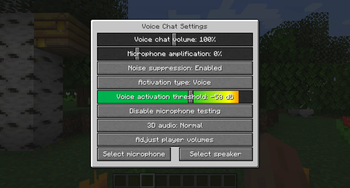
- Push to talk or voice activation, with automatic voice detection and mic gain.
- Configurable range, whispering and 3D positional sound.
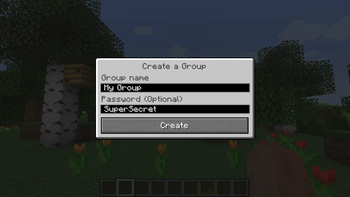
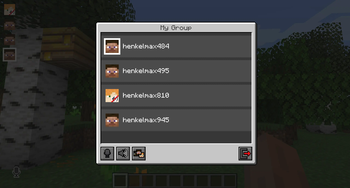
- Password-protected groups to talk with friends anywhere in the world.
- Per-player volume, mic amplification and a mic/speaker test.
- RNNoise noise suppression and the Opus codec for clear audio.
- Recording with separate tracks per speaker, handy for content creators.
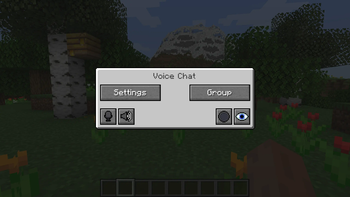
Press V in game to open the voice menu, settings and group chats.
Server setup
- Put the plugin jar in
pluginsand restart. - Open UDP port 24454 (or the port set in the config) on the host and firewall. Without it voice will not connect.
- On a proxy network, install the matching Velocity or BungeeCord build as well.
Communication is encrypted, though the author does not guarantee its security.
Addons and companions
Simple Voice Chat has a large addon ecosystem and a public API. Optional mods include Sound Physics Remastered for realistic echoes on the client and Cloth Config plus Mod Menu for a nicer settings screen. Server owners can control who may speak with LuckPerms. Prefer a voice plugin with a different feature set? Compare it with Plasmo Voice.
FAQ
Why does Simple Voice Chat say not connected?
Usually the voice port is closed. By default it uses UDP port 24454, which must be open on the server and firewall. The port can be changed in the server config.
Do players need a mod to use Simple Voice Chat?
Yes, to talk and hear others. Players install the client mod for Fabric, NeoForge, Forge or Quilt. Players without it can still join and play, just without voice.
Does it work with Velocity or BungeeCord?
Yes, there are proxy builds for Velocity and BungeeCord or Waterfall, so voice keeps working across a server network.
Gallery
Downloads by version
| Minecraft | Loader | Mod version | File | |
|---|---|---|---|---|
| 26.3 | Bukkit | bukkit-2.6.25 | 0.9 MB | Download |
| 26.3 | Folia | bukkit-2.6.25 | 0.9 MB | Download |
| 26.3 | Paper | bukkit-2.6.25 | 0.9 MB | Download |
| 26.3 | Purpur | bukkit-2.6.25 | 0.9 MB | Download |
| 26.3 | Spigot | bukkit-2.6.25 | 0.9 MB | Download |
| 26.2 | Bukkit | bukkit-2.6.25 | 0.9 MB | Download |
| 26.2 | Folia | bukkit-2.6.25 | 0.9 MB | Download |
| 26.2 | Paper | bukkit-2.6.25 | 0.9 MB | Download |
| 26.2 | Purpur | bukkit-2.6.25 | 0.9 MB | Download |
| 26.2 | Spigot | bukkit-2.6.25 | 0.9 MB | Download |
| 26.1.2 | Bukkit | bukkit-2.6.25 | 0.9 MB | Download |
| 26.1.2 | Folia | bukkit-2.6.25 | 0.9 MB | Download |
| 26.1.2 | Paper | bukkit-2.6.25 | 0.9 MB | Download |
| 26.1.2 | Purpur | bukkit-2.6.25 | 0.9 MB | Download |
| 26.1.2 | Spigot | bukkit-2.6.25 | 0.9 MB | Download |
| 26.1.1 | Bukkit | bukkit-2.6.25 | 0.9 MB | Download |
| 26.1.1 | Folia | bukkit-2.6.25 | 0.9 MB | Download |
| 26.1.1 | Paper | bukkit-2.6.25 | 0.9 MB | Download |
| 26.1.1 | Purpur | bukkit-2.6.25 | 0.9 MB | Download |
| 26.1.1 | Spigot | bukkit-2.6.25 | 0.9 MB | Download |
| 26.1 | Bukkit | bukkit-2.6.25 | 0.9 MB | Download |
| 26.1 | Folia | bukkit-2.6.25 | 0.9 MB | Download |
| 26.1 | Paper | bukkit-2.6.25 | 0.9 MB | Download |
| 26.1 | Purpur | bukkit-2.6.25 | 0.9 MB | Download |
| 26.1 | Spigot | bukkit-2.6.25 | 0.9 MB | Download |
| 1.21.11 | Bukkit | bukkit-2.6.25 | 0.9 MB | Download |
| 1.21.11 | Folia | bukkit-2.6.25 | 0.9 MB | Download |
| 1.21.11 | Paper | bukkit-2.6.25 | 0.9 MB | Download |
| 1.21.11 | Purpur | bukkit-2.6.25 | 0.9 MB | Download |
| 1.21.11 | Spigot | bukkit-2.6.25 | 0.9 MB | Download |
| 1.21.10 | Bukkit | bukkit-2.6.25 | 0.9 MB | Download |
| 1.21.10 | Folia | bukkit-2.6.25 | 0.9 MB | Download |
| 1.21.10 | Paper | bukkit-2.6.25 | 0.9 MB | Download |
| 1.21.10 | Purpur | bukkit-2.6.25 | 0.9 MB | Download |
| 1.21.10 | Spigot | bukkit-2.6.25 | 0.9 MB | Download |
| 1.21.9 | Bukkit | bukkit-2.6.25 | 0.9 MB | Download |
| 1.21.9 | Folia | bukkit-2.6.25 | 0.9 MB | Download |
| 1.21.9 | Paper | bukkit-2.6.25 | 0.9 MB | Download |
| 1.21.9 | Purpur | bukkit-2.6.25 | 0.9 MB | Download |
| 1.21.9 | Spigot | bukkit-2.6.25 | 0.9 MB | Download |
🛡 Files are downloaded directly from Modrinth’s servers – we never modify or rehost them. Modrinth ↗
How to install this mod
- You need a Paper server (Paper recommended).
- Click “Download” to get the .jar for your server version.
- Copy it into the server’s
pluginsfolder. - Restart the server; config files live in
plugins/./
💬 Comments
🔗 Works well with

LuckPerms
by lucko
A permissions plugin/mod for Minecraft servers.

Cloth Config API
by shedaniel
Configuration Library for Minecraft Mods

Mod Menu
by Prospector
Adds a mod menu to view the list of mods you have installed.
Sound Physics Remastered
by henkelmax
A Minecraft mod that provides realistic sound attenuation, reverberation, and absorption through blocks.
✨ You might also like

Plasmo Voice
by kpids
A proximity voice chat mod with audio positioning and lots of features

Click Villagers
by Clickism
Click to pick up villagers, reset their trades, change their biomes, claim them and much more!

Voice Messages
by DimasKama
Voice messages in minecraft chat

Simple Voice Chat Discord Bridge
by amsam0
A mod and plugin to make a bridge between Simple Voice Chat and Discord to allow for players without the mod to hear and speak.

Sleep
by Jodek
One player sleep by default, or set how many players must sleep to skip the night. Shows who is sleeping above the hotbar

JourneyMap
by mysticdrew
Real-time map used for mapping in-game or your browser as you explore.